Steem Wallet By Freewallet Review - Beware!
I recently decided to try out the Steem Wallet By Freewallet, available in the iOS app store. Actually, as of now it is the only Steem wallet available there, unless you count eSteem, which is actually a full Steemit app with access to your Steemit wallet.
Sending Steem To The Wallet
Getting some Steem into the wallet wasn’t much trouble. Just click on the plus button at the bottom right, then click on “Receive,” and then click on “My Wallet Address.” It will show you the address to send your Steem to, along with the required memo field.
I sent 10 Steem, and within a few seconds - bang! - the Steem was there. No transaction fees and fast as greased lightning.
Getting My Steem Out - No Go!
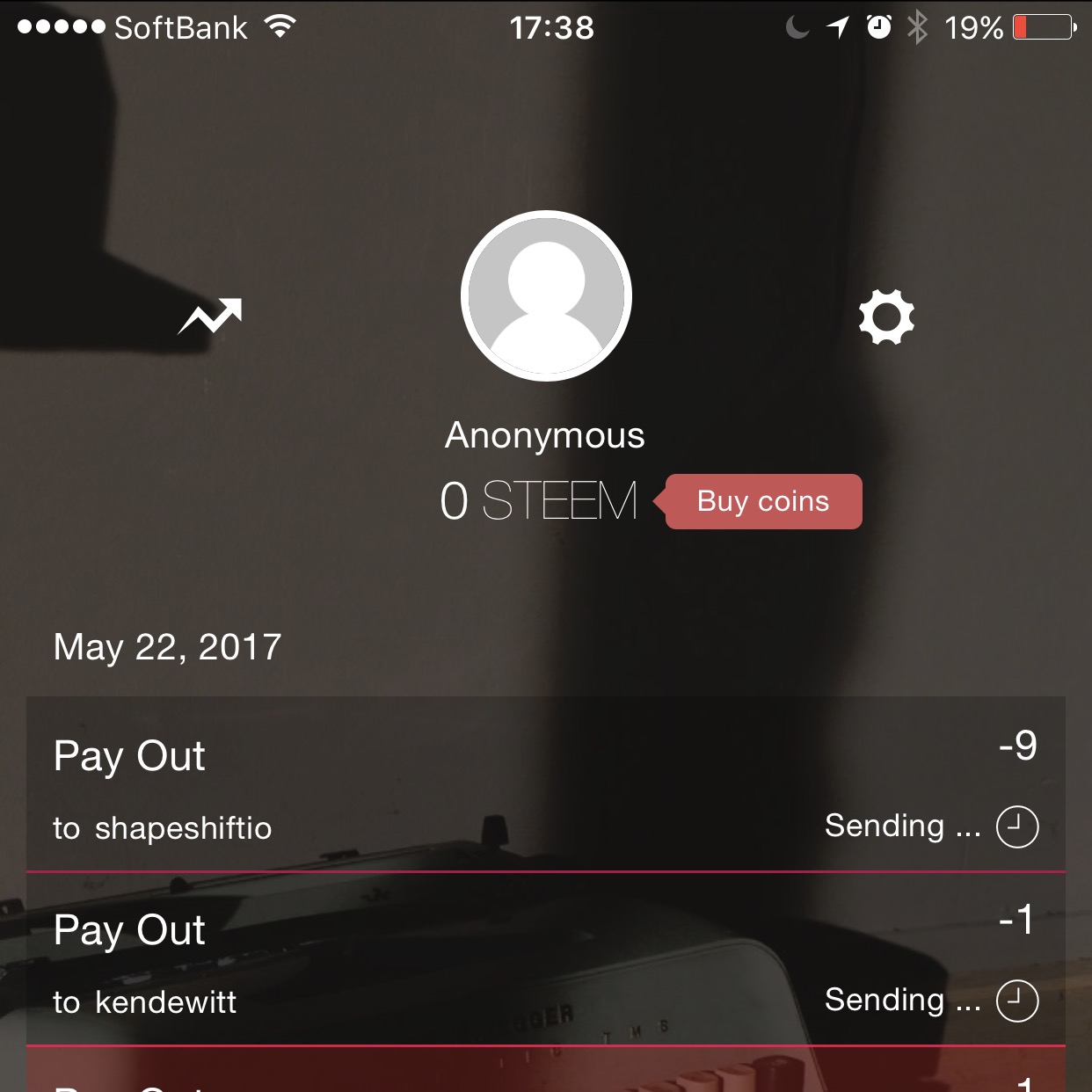
Next, I tried sending some Steem from the Steem Freewallet to my Steemit wallet. I entered my username, kendewitt, but I wasn’t sure what to put in the memo field. So I went to my Steemit wallet and found the Memo Key and scanned that into the field. I entered 1 Steem in the amount field, and clicked send. I knew something was up when I saw a red line under the transaction. I waited and waited, for over an hour, and as I write this, the red progress bar still reads “sending,” and nothing has shown up in my Steemit wallet.
OK, Let’s Try Again With Shapeshift
Since it seems I’ve lost one Steem into the ether, I thought, why not try sending some Steem through Shapeshift and converting it into actual Ether with a capital E.
I opened up Shapeshift, selected Steem to Ether, input my Ether address, and the amount of Steem to convert. Then I hit the “Shift” button, and it showed me the memo to send my Steem to for the conversion. Shapeshift doesn’t tell you the address to send Steem to, which is shapeshiftio, but I already knew what it was because I spent yesterday figuring out this also user-unfriendly app yesterday.
Sweet. I went back to the Steem Freewallet and put the address and memo in. Then I put in 9 Steem in the amount field, clicked send, and…
Still waiting. As you can see, it’s the transaction at the top that says “Sending,” and you can also see my previous attempt to send to my Steemit wallet, which says the same.
Conclusion - Go Ahead And Experiment Like Me!
I don’t recommend this wallet. But I do wish there were more people trying these things out and reporting them here on Steemit. We need better, more user-friendly on and off-ramps to get our Steem in and out. Companies that release products that aren’t user-friendly and don’t let you easily do what you want to do are not helping the community, and they aren’t helping Steemit to succeed.
If you’re a developer, get on this! You have an opportunity to provide a user-friendly experience and help the Steemit community, which in turn will increase the value of Steem.
Stay tuned for my review of Shapeshift, which also has its fair share of hiccups, but at least didn’t lock my money up in a perpetually unconfirmed transaction.
Stay safe. Beware. And always dip your toes in the water before jumping in the pool.
Published on Hive on 2017-05-22. View the original post and discussion on Hive.